 Call Theory
Remote Support
Call Theory
Remote Support
Connect a support technician to your PC.
Working with a Call Theory support technician? Use this tool to temporarily connect them to your computer.
Only use this if you're already working with a verified Call Theory technician.
If someone contacted you out of the blue and asked you to run it, hang up and call us directly.
-
Download the support tool
The Call Theory Remote Support tool doesn't install anything on your computer.
Download support tool Once you close the application, the technician is disconnected and cannot reconnect unless you run the application again and provide another code. -
Run the file you downloaded
Once the tool has been downloaded, open it from your Downloads folder or your browser's download bar.
If Windows shows "Windows protected your PC", choose More info, then Run anyway -
Enter our server settings
On Mac and Linux the tool needs to be pointed at our support server. Click the ⋮ menu next to your ID and choose ID/Relay Server — or open Settings → Network and click Unlock network settings. Then enter these two values exactly:
- ID server
sos.calltheory.com- Key
Loading…
Leave the Relay server and API server boxes empty, then click OK.
We rotate this key regularly — if the tool won't connect, come back to this page and copy the current key. On a Mac, allow Screen Recording and Accessibility when macOS asks, so we can see your screen.
-
Read us the number on your screen
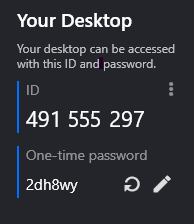
A window opens showing your support number. Read it to us over the phone, then click Accept when the connection request appears.
If we also ask for the one-time password, it's the short code just below your ID.